Overview
Connect your store

Shopper friction intelligence for Shopify

Find the question that stops shoppers buying.

Hesio watches consented shopping journeys for the moments people hesitate, then names the question most likely in the way - delivery, price, trust or choice - and shows how confident it is.

Connect in minutes · No code required

Already installed? Sign in with your store URL
  • Friction detection
  • Adaptive assistance
  • Controlled experiments

Fast Shopify setup · Works with your existing storefront

Hesio is about knowing, not guessing. It quietly watches consented shopping journeys for the moments people hesitate - and tells you which question stood between browsing and buying, before you change a single thing.

How it works

From signal to suggested test

Every insight shows its evidence and how strong it is - before anything changes on your store.

  1. Signal

    Behaviour Hesio observed, before any interpretation.

    Shipping info reopened

    Opened three times, then back to the cart and out.

    Behaviour Hesio observed
    01
  2. Confidence

    How much evidence stands behind the pattern.

    High 31 of 46 sessions

    Enough consistent signals to call it a pattern, not noise.

    Low confidence stays “collect more data”
    02
  3. Meaning

    The question those signals most likely point to.

    Delivery uncertainty

    Shoppers want to know when it arrives before they commit.

    A likely question, not a proven motive
    03
  4. Suggested test

    What to try, and only once the pattern holds.

    Delivery estimate

    Preview it in your theme. Test only after validation, 90% control / 10% Hesio.

    Nothing ships during observation
    04

Four views, one question: what stopped them?

Every number in the app traces back to a consented session Hesio actually observed. Nothing is modelled, nothing is filled in, and anything too thin to mean something says so.

  • No theme codeRuns on Shopify’s Web Pixels API
  • Consent-gatedFollows the Customer Privacy API, session by session
  • Observation firstShoppers see nothing until you approve the wording

01Friction insights

Sessions grouped by the hesitation their signals support

Delivery, price, trust or product choice - each with a share, a session count and a confidence level. Whatever the signals do not carry stays unclassified instead of becoming a guess.

WorkspaceFriction insights

Delivery46 · 43%
Product choice31 · 29%
Price19 · 18%
Trust12 · 11%

02Product signals

A shopper holding a white and a brown sneaker side by side, deciding between them.

Which products people hesitate over

Ranked by the opportunity behind them, and marked low-sample the moment there are too few sessions to trust.

WorkspaceProducts

03Weekly report

A shop owner reading a printed weekly report over coffee.

A seven-day brief you can forward

The question that cost you most, the evidence under it, the baseline to beat and the one test worth running next.

WorkspaceReports · PDF

04Assistance preview

A shop owner checking a preview on his phone in a clothing studio.

See the card before a shopper ever could

Rendered in your own theme with your own words. It stays a preview until you publish it yourself.

WorkspaceAssistance

Observation is the default state, not a trial mode. Assistance is a separate decision you make once you have seen the evidence.

Compare plans
Friction patterns

Hesitation has four shapes.

Almost every shopper who leaves had one unanswered question. Hesio groups sessions by the shape their signals actually support, and leaves anything unclear unclassified rather than guessing. Pick one to see a session behind it.

Connect your Shopify store

What Hesio sawTrail jacket · 1 session

  1. Viewed Trail jacket
  2. Opened shipping & delivery
  3. Added to cart
  4. Opened shipping & delivery again
  5. Hesio is thinkingTwo delivery checks after adding to cart. The open question is when it arrives.
  6. Showed a delivery estimate: arrives Thursday
  7. Bought the Trail jacket

Repeated delivery checks, shipping-policy visits and returns to the cart.

Likely question

“When will it arrive?”

Suggested test

Show a delivery estimate on the product page, in your theme.

Preview only · 90% control / 10% Hesio
The first week

Confidence is earned, not assumed.

Installing takes minutes. Understanding takes about a week, because a pattern has to separate itself from noise before Hesio will put a name on it.

  1. Day 0

    You connect

    Authorize Hesio in Shopify and see every permission before you approve it. No theme edits - it installs through the Web Pixels API.

    Storefront unchanged

  2. Day 1

    Signals start arriving

    Consented sessions begin landing. Your shoppers see nothing different, because nothing on your storefront has changed.

    Storefront unchanged

  3. Day 3

    Shapes separate from noise

    Patterns with enough sessions behind them get a confidence level. Anything thinner stays “collect more data” rather than becoming a headline.

    First patterns · low confidence

  4. Day 7

    A baseline worth acting on

    Your first weekly brief: which question cost you the most, the evidence behind it, and the single test worth running next.

    Baseline set · ready to act

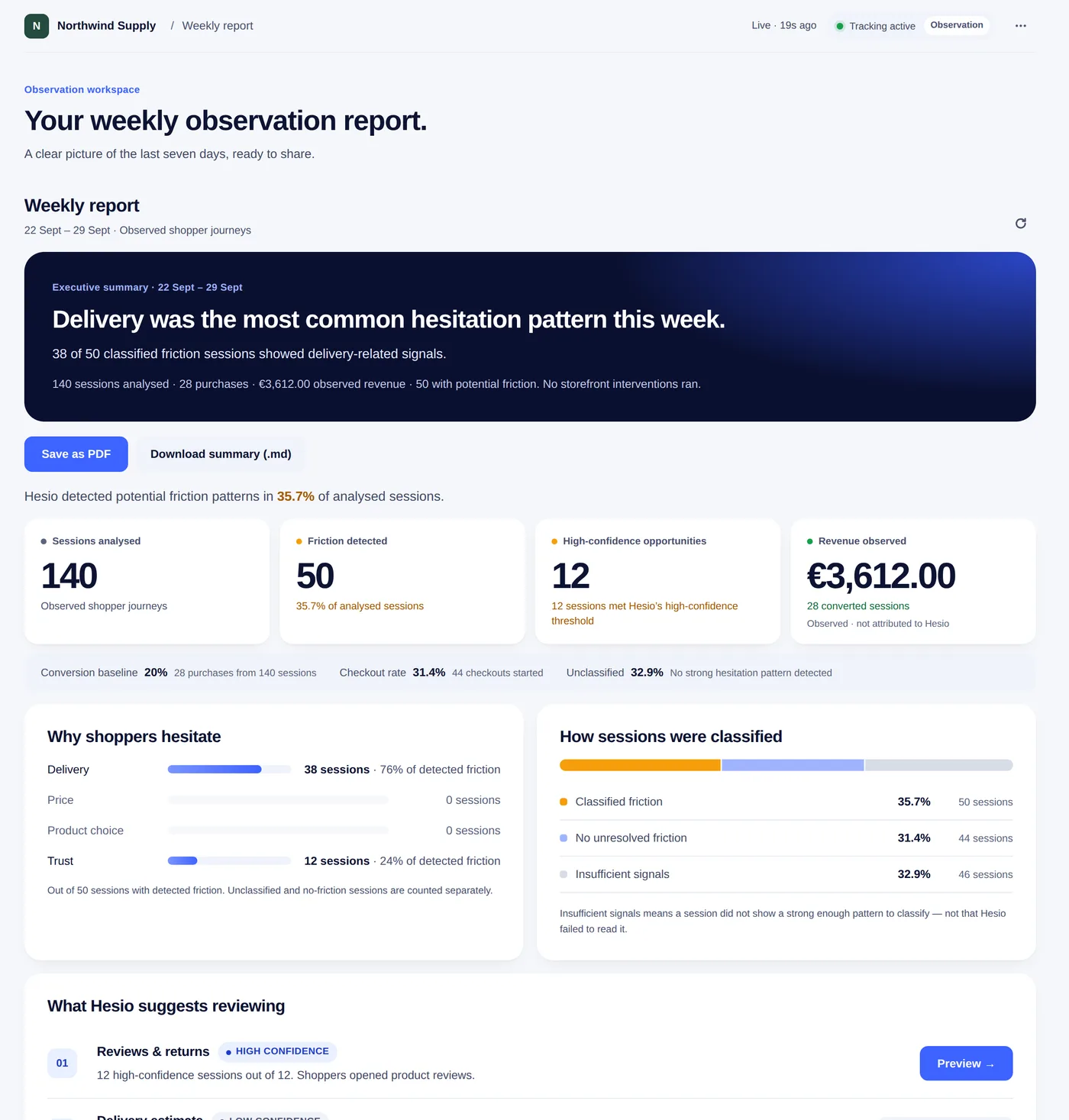
This is what lands on day seven.

The report screen itself, not a mock-up. Four parts, in the order you read them.

The Hesio weekly report screen: 140 sessions analysed, 50 with potential friction, 12 high-confidence opportunities, a breakdown of why shoppers hesitate and an observed conversion baseline.SummaryEvidenceBreakdownNext

Built for the platform you sell on

Hesio launches on Shopify. Support for more e-commerce platforms is in development.

ShopifyAvailable now
  • Web Pixels API - no theme code edits
  • Theme app extension for on-page assistance
  • Installs in minutes from the Shopify admin
Install on Shopify
In development
  • WooCommerce
  • PrestaShop
  • BigCommerce
  • Shopware
  • Wix
  • Squarespace

Selling on another platform? Tell us which one and we’ll prioritise it.

Platform names and logos are trademarks of their respective owners. Hesio is not affiliated with or endorsed by them.

Privacy by design, not by footnote

No emails, names, addresses, IP identifiers or search text are retained. Consent denial fails closed, and uninstalling stops collection.

  • Pseudonymous visitor IDs, tenant-scoped
  • URL queries and checkout paths redacted
  • Revenue is observed, never attributed to Hesio

Pricing

Watch for free. Pay when Hesio starts helping.

One app, three levels. Observation is free forever - you only pay once Hesio moves from telling you what happened to doing something about it. Change level any time inside Shopify.

Observation

$0forever

See where shoppers hesitate, and which question was in the way.

  • Friction detection on consented sessions
  • Four patterns, each with a confidence level
  • Weekly report in your workspace
  • 1,000 sessions a month
  • 7 days of history
  • Nothing is ever shown to your shoppers
  • Product signals
  • Weekly PDF by email
  • Assistance previews in your theme
Install on Shopify

No card. Uninstalling stops collection the same day.

Most stores start here

Insight

$19/ month

Know which products it costs you, and see the fix before you ship it.

  • Everything in Observation
  • Product signals - which products appear in hesitant journeys
  • Weekly PDF, emailed to whoever needs it
  • Assistance previews rendered in your own theme
  • 20,000 sessions a month
  • 12 months of history
  • Assistance shown to real shoppers
  • Controlled experiments
Install on Shopify

14-day free trial, then billed through Shopify.

Assist

$49/ month

Answer the question in the storefront, and prove whether it worked.

  • Everything in Insight
  • Contextual assistance shown to real shoppers
  • Controlled experiments - 90% control, 10% Hesio
  • Product and cart placement, wording per pattern
  • Measured against your own baseline
  • Unlimited sessions
Install on Shopify

14-day free trial. Nothing reaches a shopper until you approve the words.

Every level runs on Shopify’s Web Pixels API and needs no theme code edits. Prices in USD, excluding taxes.

FAQ

Frequently asked questions

Short answers on cost, data, and what Hesio does and does not change on your storefront.

Something not covered here? hello@oxtren.com

What does Hesio cost?

Observation is $0 and stays $0 - 1,000 sessions a month, the four patterns and a weekly report. Insight is $19 a month and adds product signals, emailed PDF reports and previews in your theme. Assist is $49 and is the only level where anything reaches a shopper. Both paid plans start with a 14-day free trial. You change level inside Shopify, and nothing upgrades itself.

Will it slow down my store?

No. Hesio runs through Shopify’s Web Pixels API in a sandboxed worker, outside your theme. No theme code edits and no render-blocking scripts.

Does Hesio change what my shoppers see?

Not during observation. Assistance cards exist only as previews in your own admin. Nothing reaches a shopper until you review the text, approve it and start a controlled test.

What data do you actually store?

Pseudonymous visitor IDs scoped to your store, plus the page and event types a session touched. No emails, names, addresses, IP identifiers or search text. URL queries and checkout paths are redacted before they reach us.

Why is observation free?

Because telling you what happened is the part we are most confident about, and the part that costs us least. You should not pay to find out whether Hesio sees anything in your store. You pay when it starts doing something about it.

Are the numbers on this page real?

The weekly report screenshot is the real report screen from the app, filled with a demonstration store’s data. The charts elsewhere on this page illustrate the shape of the answer rather than any one store’s results. Your own numbers arrive after 24–72 hours of shopper activity.

When will I see something useful?

An initial picture after 24–72 hours. A baseline worth acting on takes about seven days, because a pattern needs enough sessions to separate itself from noise.

Can Hesio tell me why a shopper left?

It tells you the most likely question they had, with a confidence level. Signals point to a question, not a proven motive - unclear sessions stay unclassified rather than getting a guess. That is deliberate: a confident wrong answer is worse than an honest “collect more data”.

What happens if I uninstall?

Collection stops the same day and billing stops with it. You can export everything Hesio has gathered before you go, and we delete your store’s data within 30 days.

How does installation work?

Install from the Shopify App Store. Shopify shows you every permission before you authorize anything, the observation embed goes on through the Web Pixels API, and there are no theme code edits. You are on Observation from the first session.


Start with a free week

See your store through your shoppers’ questions.

One week of observation, free, and nothing changes on your storefront. By day seven you’ll know which question is costing you the most, and whether it is worth answering.

  • Observation plan free forever
  • No theme code
  • Shoppers see nothing new
Storefront preview

Your future assistance card

Preview only · Customers cannot see this card.